The Apple Watch app
What this covers: installing the watch app, the two ways it runs a workout, cardio and HealthKit, and what happens when the watch is offline. The Apple Watch app is part of the Pro plan.
Everything below is the Apple Watch app. On Wear OS the watch app mirrors a workout your phone is running — the set you're on, the load and the reps, and the rest countdown, all changeable from the wrist — and nothing else on this page applies to it yet: no standalone workouts, no Digital Crown, no cardio, no heart rate, no Apple Health. Reopen it from the app list if your watch has slept. It's part of Pro as well, and it arrives on Google Play at launch in the same listing as the Android app.
Installing
- Install the iPhone app and sign in.
- Open the Watch app on your iPhone, find Resistance, and install it.
- Open it on the watch once while your phone is nearby so it can pull your account.
Two modes
Mirrored — your phone is running the session and the watch is a remote. Check a set off on your wrist and it lands on the phone immediately; change something on the phone and the watch follows.
Standalone — no phone needed. The watch holds your templates, runs the whole session on its own, and uploads it when it next has a connection.
Logging on the wrist
- The Digital Crown adjusts reps without covering the screen with your finger.
- The weight keypad is there when you need an exact number instead of a nudge.
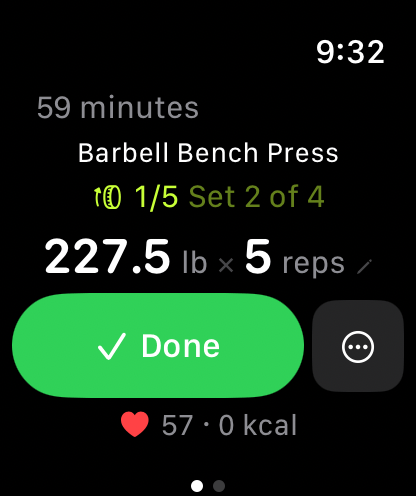
- Three views: Now (the set in front of you), Exercises (the rest of the session), and Metrics (heart rate, elapsed, calories).
Cardio
Treadmill or outdoor GPS, with live pace, distance, and heart rate. Every session — lifting or cardio — runs as a real HealthKit workout, so it counts toward your rings and lands in Apple Health.
HealthKit permissions
Resistance writes workouts and active energy, and reads bodyweight if you let it. If you denied permission and want it back, it's in the iPhone Health app under Sharing → Apps → Resistance. Health data is never used for advertising and never sold.
Offline
A standalone session doesn't need your phone or a network. Finished sessions sit in a retry queue and upload as soon as the watch can reach the API — including after a reboot. Nothing is lost by walking out of range.
If something's wrong
- The watch can't see my templates — open the iPhone app once with the watch nearby; templates sync from the phone's cache.
- A session hasn't uploaded — open the watch app on Wi-Fi or near the phone and leave it foregrounded for a few seconds.
- The watch app says Pro is required — your plan is read from the account; open Settings → Resistance Pro on the phone to re-check.